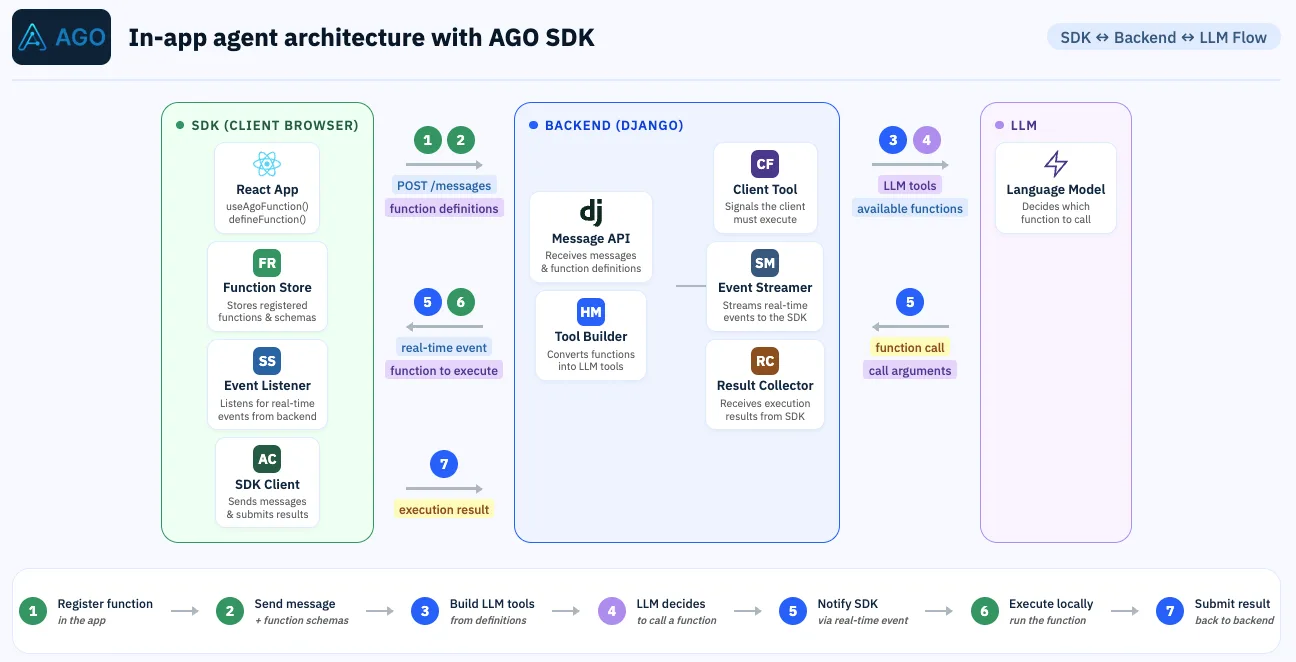
The AGO SDK puts an agent inside your product. You register functions, such as navigating to a page, filtering a list or filling a form, and your in app agent calls them to act for your customer instead of describing how to do it.
The same SDK makes your product automatically WebMCP compatible. Set webmcp: true and every function you registered for your AGO agent also becomes a tool for the agents your customers bring, in a browser that supports WebMCP. There is no second integration to build. An in app agent and WebMCP are two of the three ways an AI agent can drive a web page, and with the SDK your product offers both.
That means two kinds of agents now work in your product, and until now you could only see one of them. Since @useago/sdk 1.13.2, every call an outside agent makes through WebMCP is reported to AGO, and it shows up next to the calls your in app agent makes.
A browser agent working in your product leaves no trace today
When your AGO agent calls a function, the result goes back to AGO to continue the conversation, so the call is already stored. A browser agent is different. It runs your function in the page and keeps the result for itself. Its conversation with your customer lives with the browser or the agent vendor, and nothing reaches your backend unless the function itself happens to call it.
So you ship WebMCP, and then you cannot answer the first questions your product team will ask: are agents using it, which functions, and do those calls work?
The SDK reports each call, because it is the one serving the tool
The WebMCP tools are served by the AGO SDK, so the SDK sees every call go through. With webmcp: true, it now sends one report per call:
- The function name and the arguments the agent passed
- What your handler returned, or the error it threw
- How long the handler took
- A tab id that groups one agent's run of calls together
const client = new AgoClient({
  baseUrl: "https://YOUR-DOMAIN.useago.com",
  agent: "your-agent",
  webmcp: true, // also turns on call reporting
});
There is no separate switch. The report is fire and forget: nothing waits for it, the call never slows down because of it, and a failed report is dropped rather than retried so a call is never counted twice. Functions registered with navigates send it with keepalive, so the report still lands when the page unloads.
The function's declaration travels with the reports of each tab until AGO has recorded it. A page whose functions are only ever called by outside agents therefore still gets them recorded in AGO, even if your in app agent has never used them.
What AGO does not receive is the agent's conversation. You see what it did in your product, not what your customer asked it.
The Client Functions page answers what your product team will ask
In AGO, the calls land on a Client Functions page under Settings / Developer tools. It covers both callers, your in app agent and WebMCP, and you can look at either one on its own.
| Tab | What it tells you |
|---|---|
| Usage | Call volume per day, failure and abandonment rates, calls per function, and which pages agents navigated to |
| Calls | Every call, filterable by period, agent, user, function and outcome |
| Registration health | Each function's declaration measured against the WebMCP size budgets |
Each call gets one of four outcomes. Failed means the handler threw or returned success: false. Rejected means your customer declined an action that asked for approval. Abandoned means the call never got an answer. Everything else is OK. A result that went over maxResultBytes is marked Truncated, because the agent only got a preview of it.
A session shows one agent's run from start to finish
A single failed call rarely explains much. The session page puts every call of one run in order, oldest first, with its duration, arguments and a preview of the result. For your in app agent, a session is a conversation. For WebMCP, it is a browser tab, grouped by the tab id the SDK sends.
That is where a pattern becomes visible, for example an agent that asks navigateToPage for a page that does not exist, reads data from the wrong screen, then stops.
Registration health catches declarations agents will struggle with
Browser agents choose between tools by reading their name and description. Chrome's WebMCP guidance sets budgets for those: 30 characters for a name, 500 for a description, 30 for a parameter name, 150 for a parameter description, and 1,500 bytes for a result. The SDK already warns in the console when you go over.
The Registration health tab measures the latest declaration AGO received for each function against the same budgets, puts the ones over budget at the top, and shows the size of the last result each one returned. It helps you find the function that is too long to be picked reliably. It does not tell you whether a description is good. That still needs someone to read it.
The calls show what your customers delegate to agents
The questions this lets you answer are product questions, not only debugging ones:
- Which of your features outside agents actually use, and which they never find
- Which functions fail most often, and in which sessions
- Where agents navigate in your product, which is a signal of what your customers delegate to them
The in admin Assistant can drive the page too, so "which client function fails most this week?" gets you the filtered answer instead of the screen.
To start, update to @useago/sdk 1.13.2 or later and set webmcp: true. The functions guide covers the bridge, and our WebMCP page explains what it changes for your customers.